 RibbonKeys
Windows Excel shortcuts on a Mac
Windows shortcuts work in Excel on a Mac with RibbonKeys: it draws the Alt-key letters over the ribbon, and Option stands in for Alt. Tap Option, then type the sequence you already know, such as H O I to fit the column width.
They are the Alt-key shortcuts from Excel for Windows, including the items of a dropdown. Esc steps back one level, and the Excel 2003 menu keys work, such as E S for Paste Special. H O I fits the column width, H V V pastes values, and W F F freezes panes.
How it works in Excel
-
Tap ⌥
With Excel in front, tap the Option key by itself. Every tab gets its letter: H Home, N Insert, P Page Layout, M Formulas, A Data, R Review and W View. The Quick Access Toolbar takes numbers from the left.

-
Type the tab's letter
The tab opens and every control on it gets its letters. The last letter presses the button: A T switches the filter on, H B A draws all borders.

-
Type on, or step back
Dropdowns and their submenus get letters too: H L H G goes to Greater Than…, through Conditional Formatting and Highlight Cells Rules. Esc steps back one level. Another tap on ⌥, or a click, ends the sequence. The picture is Home's Format dropdown, H O, where I is Auto-fit Column Width.
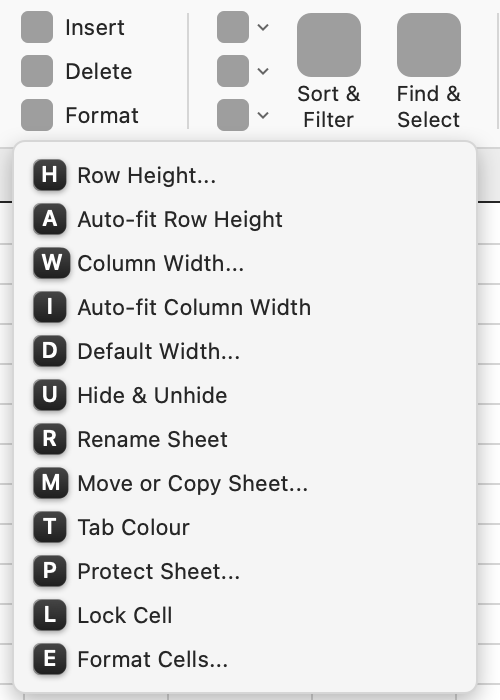


Holding ⌥ down with the first letter starts a sequence too, as Alt does on Windows, except while the keyboard is in a text field, such as a cell being edited, where ⌥ goes on typing accents and symbols. A tap on ⌥ by itself always starts one.
Only in Excel
- Dialogs. An open dialog gets letters on its controls, as on Windows. In Format Cells the tabs take the digits 1 to 6: 2 goes to Alignment, and W then ticks Wrap text.
- The menu keys of Excel 2003. E S opens Paste Special and O C A auto-fits the selected columns, run from Excel's menu bar.
- The tabs Excel adds for what is selected. Table, Chart Design, Pivot Table Analyse, Shape Format, Picture Format, Header & Footer and the others get their letters while they show.
- Ctrl U underlines. On the Mac it edits the cell. RibbonKeys makes it underline, as on Windows, and a switch in Settings turns that off.
- Not tested yet. The Draw and Automate tabs have their letters, but need a Microsoft 365 subscription to be tried, and that has not been done.
Every letter is on the full list of Excel shortcuts, and the sequences people type most are on a one-page sheet.
Word and PowerPoint
The same licence covers Word and PowerPoint. RibbonKeys draws their Windows letters over their ribbons the same way, without the dialogs, the menu keys and Ctrl+U: see Windows Word shortcuts on a Mac and Windows PowerPoint shortcuts on a Mac. Questions about the licence, working offline, privacy and updates are answered on the questions page.
Download RibbonKeysFree for 7 days, with no account and no card. After that €3.99 a month or €59.99 once, including VAT.
Needs macOS 13 or later and Excel for Mac.